
Home / Features / Geolocation Tracking
Geolocation Tracking
Confirm that checkpoints are being scanned in the right location. GPS verification adds an extra layer of accountability for multi-building properties and large campuses.
Location Verification
Verify that guards are where they say they are
When geolocation tracking is enabled, the app captures the guard's GPS location at the start of a patrol. This confirms that checkpoints are being scanned in the correct area of your property, not from a break room or a parking lot. For security companies managing multiple buildings or large campuses, this is a simple way to confirm that guards are physically present at the right facility before they begin scanning.
- GPS location captured at the start of every patrol
- Confirms guards are in the correct building or area
- Especially useful for multi-building communities
- Location data included in the patrol report
- No continuous tracking throughout the route


Privacy-Conscious Design
Location is captured at patrol start, not tracked continuously
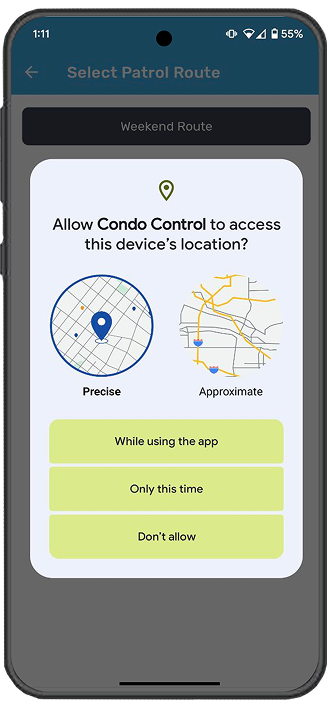
Patrol Points does not follow guards throughout their route. The app records location at the moment a patrol begins, then stops. This gives management the verification they need without creating a surveillance environment. Guards are shown a clear location permission prompt before any data is collected, and they can see when geolocation is active.
Workspace Configuration
Enable or disable geolocation from your workspace settings
Administrators control geolocation tracking from the Security Patrol setup page on the web dashboard. When enabled, every guard who starts a patrol will be prompted to share their location. The setting applies to all routes in the workspace. Location data is stored alongside the patrol report so management can review it when needed, whether that is for internal quality checks or client-facing accountability reports.
- Enabled or disabled from the workspace settings page
- Applies to all patrol routes in the workspace
- Guards see a permission prompt before location is shared
- Location data stored with the patrol report
- Useful for contract security companies proving on-site presence

Related Features


Get Started
One platform for your entire security team
Manage accounts, permissions, and activity from a single workspace.
Request a Demo