
Home / Features / Schedule Patrols
Schedule Patrols
Automate your patrol scheduling with recurring daily, weekly, or monthly routes. Guards always know what is next and management always knows what was completed.
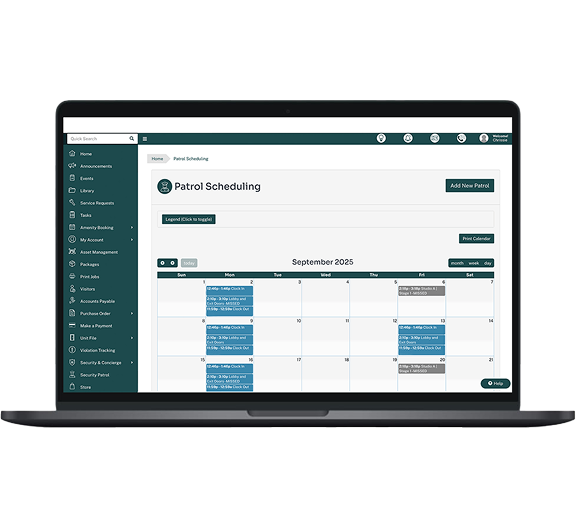
Recurring Schedules
Schedule routes every day, every week, or every month
You have full control over how often each route should be patrolled. Select any active route and configure a recurring schedule. Use daily schedules for high-traffic areas, weekly schedules for standard coverage, or monthly schedules for periodic checks. You can specify exact start times and leave comments for the officer covering the route.
- Daily schedules for every day or weekdays only
- Weekly schedules with specific days of the week
- Monthly schedules on a specific day of the month
- Optional end dates for time-limited assignments
- Comments visible to the patrol guard on their mobile app


Calendar Management
The patrol calendar keeps everyone organized
View all scheduled patrols in a day, week, or month view. Management can assign colour codes to each route for easy visual identification. Analyze patrols by completion status and quickly spot missed or incomplete routes. Making changes to any scheduled patrol takes just a few clicks.
Get email notifications when a patrol is completed, partially completed, or missed so you are always informed without having to check the dashboard.
Mobile-ready
Guards plan ahead from their phone
Security staff can check their upcoming patrols directly from the mobile app. They will see which routes are assigned, what time they start, and any comments left by management. If a scheduled patrol is available, guards tap to begin. If no scheduled patrol is set, they can start an unscheduled patrol from any active route.
- View upcoming scheduled patrols on mobile
- Start scheduled patrols with one tap
- Launch unscheduled patrols from any active route
- See management comments before starting a route
- Missed patrols are automatically flagged in the system

Related Features

Customizable Routes
Create, reorder, and manage checkpoint sequences for any facility layout.
Learn more →

Mobile App
Easy-to-use NFC scanning, incident reporting, and offline mode from a smartphone.
Learn more →Get Started
Ready to automate your patrol scheduling?
Stop tracking patrols on paper. Start scheduling, monitoring, and reporting with Patrol Points.
Request a Demo