
Home / Features / Incident Reporting
Incident Reporting
File detailed incident reports the instant something happens. Attach photos, link to checkpoints, and notify the right people instantly.
Report From the Field
Create incident reports mid-patrol or from the home screen
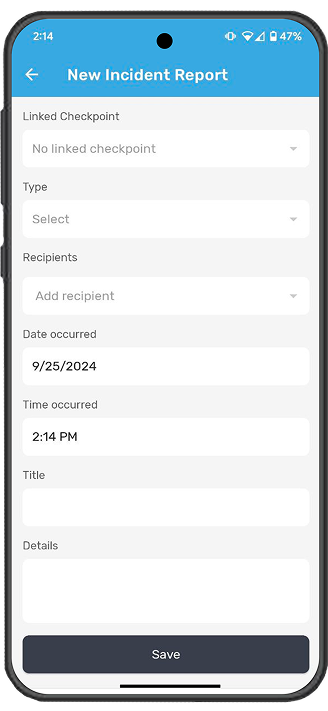
Guards can file an incident report at any point during a patrol, or from the home screen if a patrol is already in progress. The report form captures the essential details: incident type, date and time occurred, title, details, and an optional linked checkpoint. If the workspace allows it, guards also select the recipients who should be notified. The report syncs automatically, or queues locally if the guard is offline.
- Create reports during a patrol or from the home screen
- Link incidents to a specific checkpoint (optional)
- Select incident type from pre-configured categories
- Date and time prepopulated but can be changed
- All mandatory fields are validated before saving


Photo Evidence
Attach photos and images to any report
Guards can take a photo directly from the camera or upload an existing image from their gallery. Photos attach to the incident report and sync alongside the rest of the patrol data. If the guard is offline, the image is stored locally and uploads when connectivity returns. A confirmation message lets the guard know the image was saved successfully.
Routing and Reporting
Make sure incidents reach the right people
Incident reports can be routed to property managers, security supervisors, board members, or all three. Recipients are notified immediately. Management can also run reports filtered by incident type, date range, or route to spot patterns and recurring issues. If one area of your facility is generating more incidents than others, you will see it in the data and can adjust your patrol coverage accordingly.
- Route reports to managers, supervisors, or board members
- Recipients receive instant notifications
- Filter incident reports by type, date, or route
- Spot patterns and recurring issues with historical data
- Export reports as PDF or spreadsheet

Related Features


Get Started
Ready to modernize your security operations?
See how CondoControl helps security teams file better reports, faster.
Request a Demo